CheckTasks is the all-in-one app for patrols, inspections and compliance checks — helping security, hospitality and property teams prove every job was done.
Tasks, checks, patrols, schedules — do them all with CheckTasks
Your team scans a QR code or NFC tag at every checkpoint and completes the checklist on their phone. You get time-stamped, GPS-checked proof — and an alert if anything is missed.
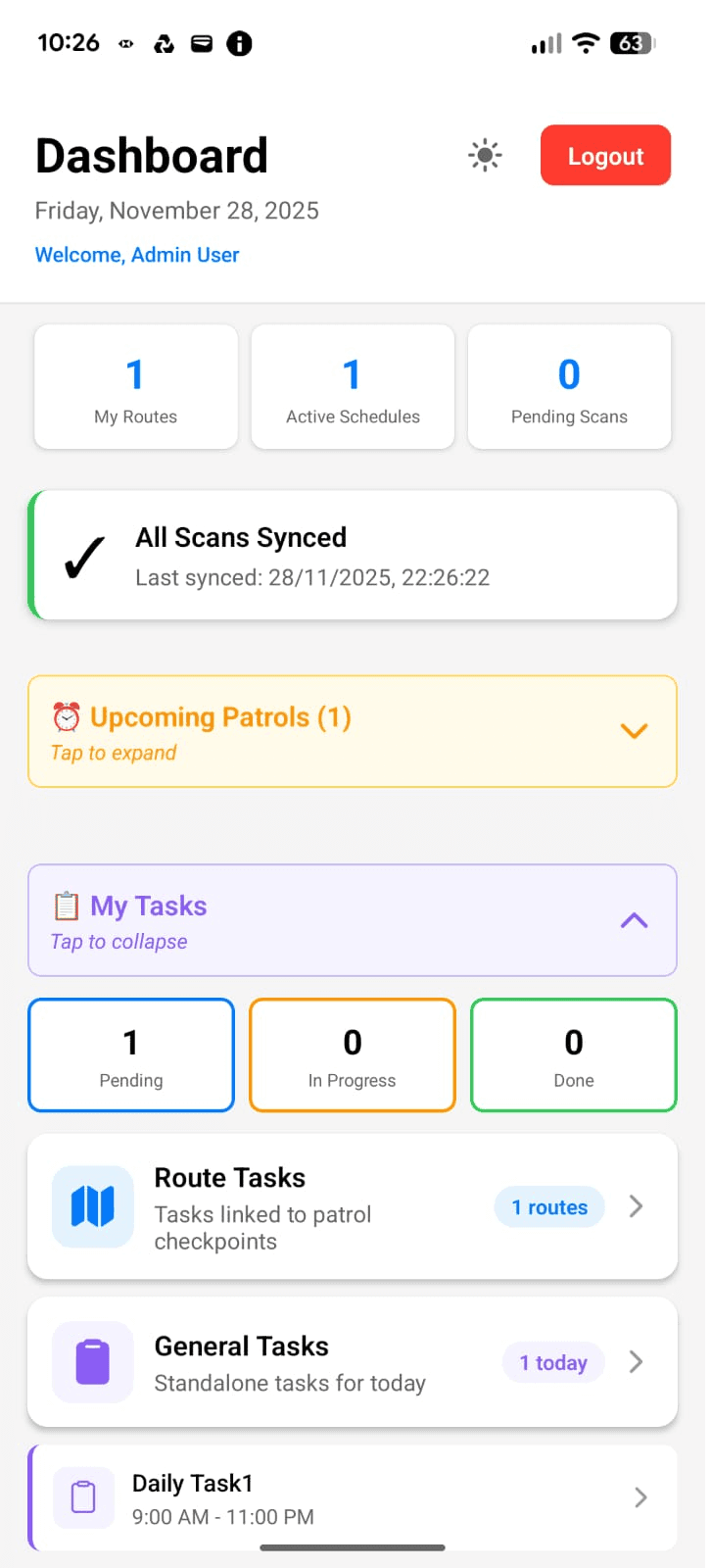
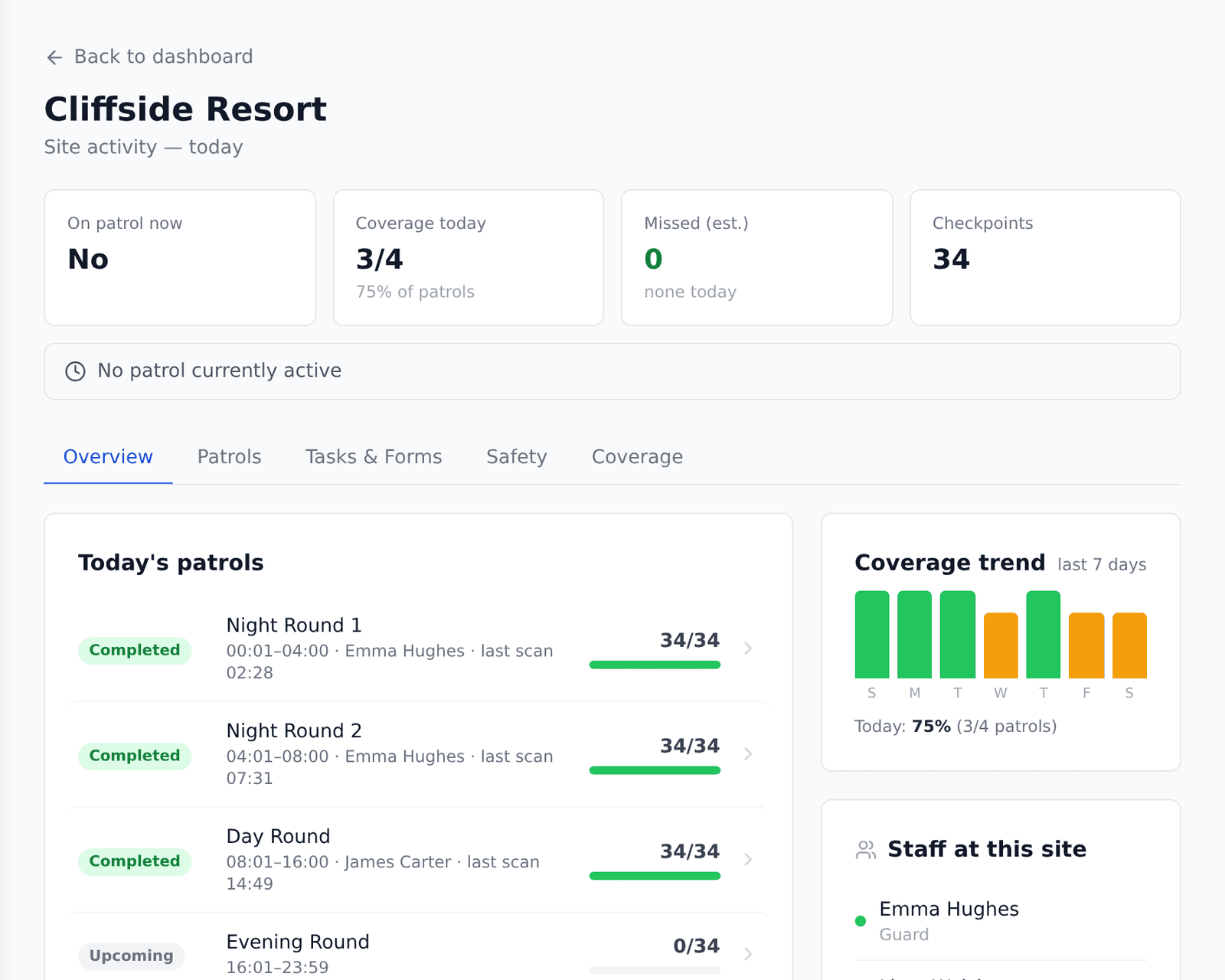
Live view of every site, today

“With CheckTasks every checkpoint just scans, it works offline, and it shows up time-stamped across all three hotels … It has taken the guesswork out of compliance.”— FJB Operations Manager
Built for teams who have to prove it
Whether it's a client, an insurer, a council or a food-safety officer asking — you'll have the record.
Patrols, inspections and appliance checks in one app
Every plan includes every feature. No add-ons to buy, no modules to unlock.
QR & NFC checkpoints
Staff scan a QR code or NFC tag at each location. Every scan is time-stamped and GPS-checked, so you know they were really there.
Routes & schedules
Ordered rounds with time slots, overnight shifts and a calendar preview, so everyone knows what is due and when.
Missed-patrol alerts
Late, missed or incomplete rounds are flagged automatically and emailed to managers — with a reason request for each miss.
Incident reporting
Report incidents from the field with photos, GPS and signatures. Each incident type is emailed straight to the people you choose.
Compliance reports
Patrol, missed-checkpoint, guard-activity and incident reports as PDF, Excel or CSV — or emailed on a schedule.
Works offline
Scans, forms, photos and sign-offs are saved on the phone and sync automatically when signal returns.
Invite your team in minutes
Invite staff by email and send them the step-by-step Guard Guide. Non-security staff see "Start Checks" instead of "Start Patrol".
Lone worker SOS
An SOS button in the app that attempts to email your own supervisors with the worker’s location, with a full audit trail. Self-monitored.
How it works
From paper checklist to provable checks in four steps
Add your sites & checkpoints
Print QR codes or write NFC tags and stick them where checks happen — doors, corridors, fridges, plant rooms.
Build rounds & checklists
Group checkpoints into routes, attach a checklist from the template library, and set the schedule.
Your team scans & records
Staff follow the round on the Android app, scanning each point and completing checks — even offline.
You see proof, not promises
Live progress, missed-check alerts and reports you can hand to clients, insurers and inspectors.
Simple plans, every feature included
Pick a plan by the size of your operation. Every plan starts with a free 30-day trial — no card needed.
Basic
Small teams & single sites
- Up to 3 sites
- 100 checkpoints
- 3 staff logins
- Every feature included
Standard
Growing teams across several sites
- Up to 10 sites
- 500 checkpoints
- 10 staff logins
- Every feature included
Premium
Larger multi-site operations
- Unlimited sites
- 1,000 checkpoints
- 20 staff logins
- Every feature included
Getting started costs nothing
We'll help you move off paper and spreadsheets — before you've paid a penny.
30 days free, no card
Full access to everything. Nothing is charged automatically when the trial ends.
Free setup help
We’ll help you map your sites, checkpoints and rounds so you’re live in days, not weeks.
Free paper-form conversion
Send us your existing paper checklists and we’ll rebuild them as Smart Forms for you.
Team onboarding built in
Email invites and a plain-English Guard Guide get your staff scanning on day one.
Frequently asked questions
How does the free trial work?
Sign up with your work email and you get 30 days of full access on our Standard plan — no credit card needed. Choose a plan any time during the trial to carry on. Nothing is ever charged automatically.
What equipment do I need?
Just Android phones for your team and printed QR codes (free, printed from the dashboard) or low-cost NFC tags. Managers use the web dashboard from any computer.
Is there an iPhone app?
The mobile app is on Android today and an iPhone version is coming soon. The web dashboard works on any device, including iPhones and iPads.
Does it work without signal?
Yes. Scans, checklists, photos, incidents and sign-offs are stored on the phone and sync automatically when the connection returns — in basements, lifts, plant rooms and grounds.
How long does setup take?
Most teams can set up a site, print checkpoints and run their first round in an afternoon. We offer free setup help and will convert your existing paper forms for you.
How does CheckTasks compare to other apps?
We publish side-by-side comparisons with QR-Patrol, SafetyCulture, TrackTik, Silvertrac and Trackforce GuardTek at checktasks.app/compare — including where each of them may suit you better. In short: CheckTasks combines patrols, checklists and appliance checks in one app, with simple GBP plans and every feature on every plan.
Is it only for security companies?
No. CheckTasks started in security patrols, and today hotels, property teams and facilities staff use the same app for inspections, cleaning checks and appliance temperature logs. Non-security staff see "Start Checks" rather than "Start Patrol".
Where is my data stored?
CheckTasks is built and supported in the UK by Cloudserve Ltd. Data is encrypted in transit, location data is kept for 14 days by default (configurable), and you can read our privacy policy for full details.
Ready to prove the job got done?
Set up your first site this afternoon. 30 days free, every feature, no credit card.
Nothing is charged automatically when your trial ends. Prices exclude VAT.