Any reading, logged and proven on the spot
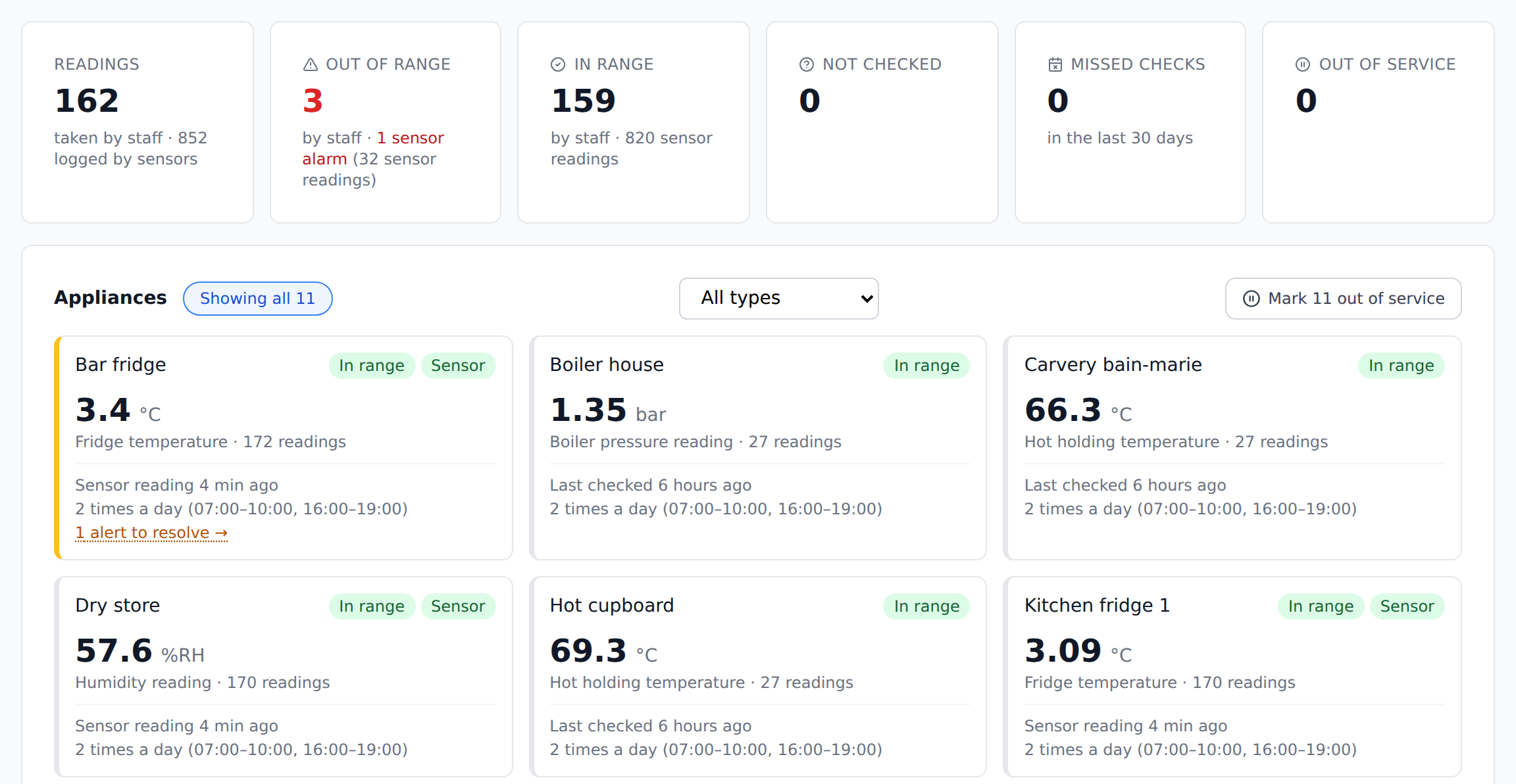
Fridge temperatures, pool chemicals, boiler pressures, meter readings — if it's a number someone checks on a schedule, staff scan the QR or NFC tag and enter it. CheckTasks checks it against your limits, alerts you if it's out of range or missed, and keeps the record — no sensors to buy.
Start your trial and we'll switch readings on for you — usually within one working day.
How it works
The same scan-and-check routine your team already uses for patrols and inspections.
Tag each check point
Stick a QR code or NFC tag wherever a reading is taken — a fridge, a pool plant room, a boiler, a meter. Already have QR stickers? Use them.
Staff scan and enter the reading
On their round, staff scan the tag and type the number — a temperature, a pH, a pressure, a meter reading. The scan proves it was taken on the spot.
Checked against your limits
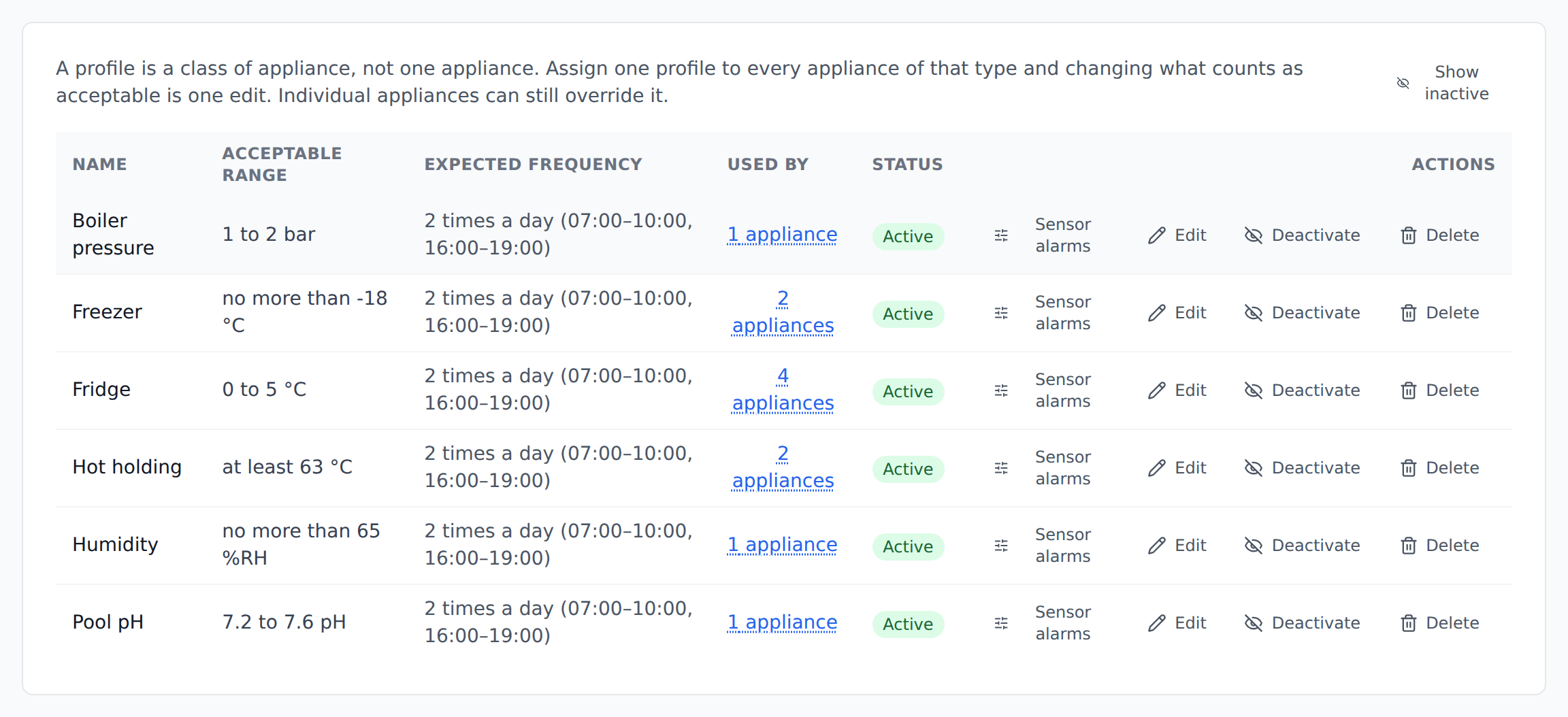
Every reading is compared with the limits you set — say 0–5 °C for a fridge or 7.2–7.6 for pool pH — and the limits are stored with the reading.
You hear about problems
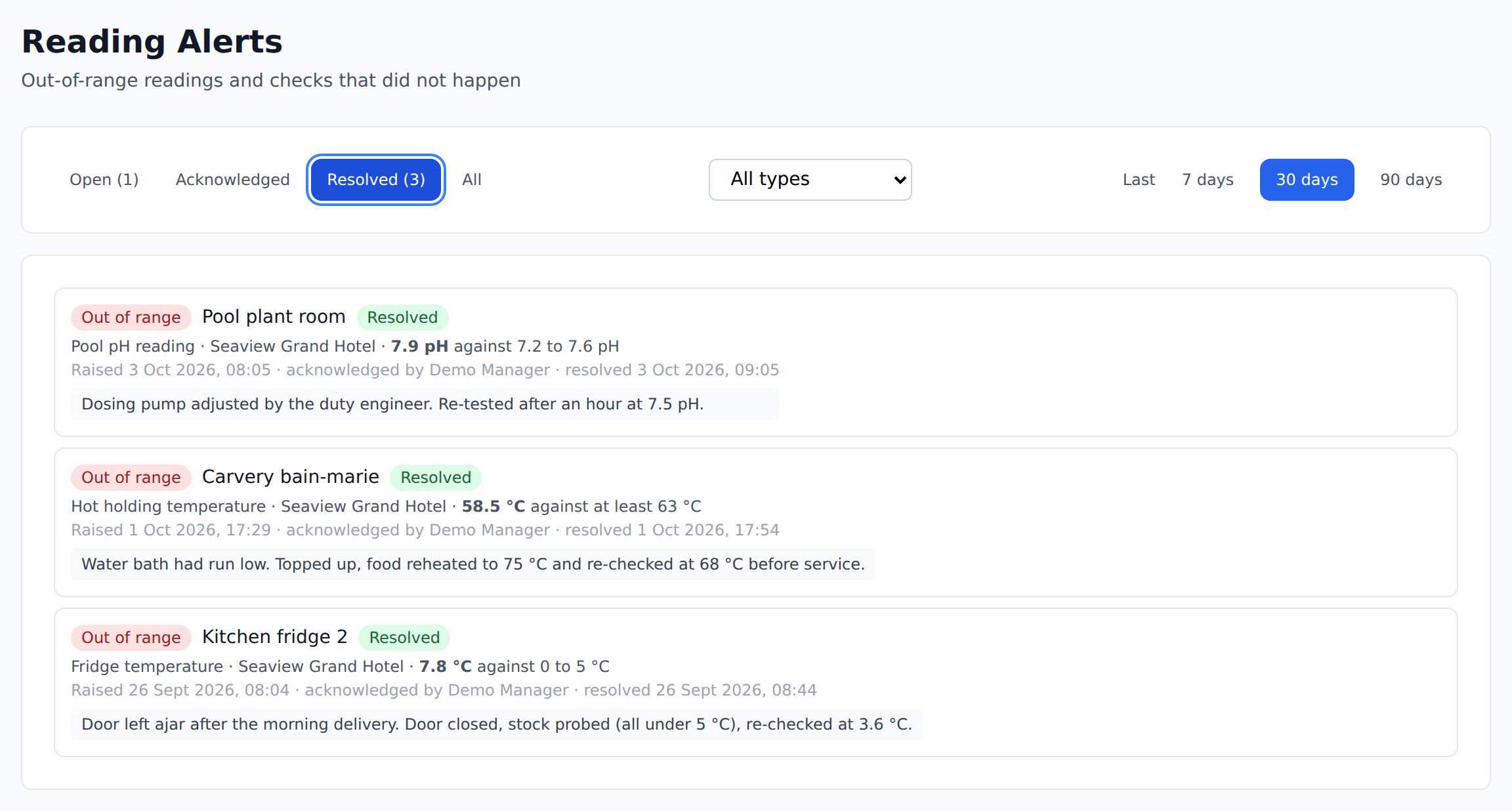
Out-of-range or missed checks raise an alert for managers, who record what was done about it.
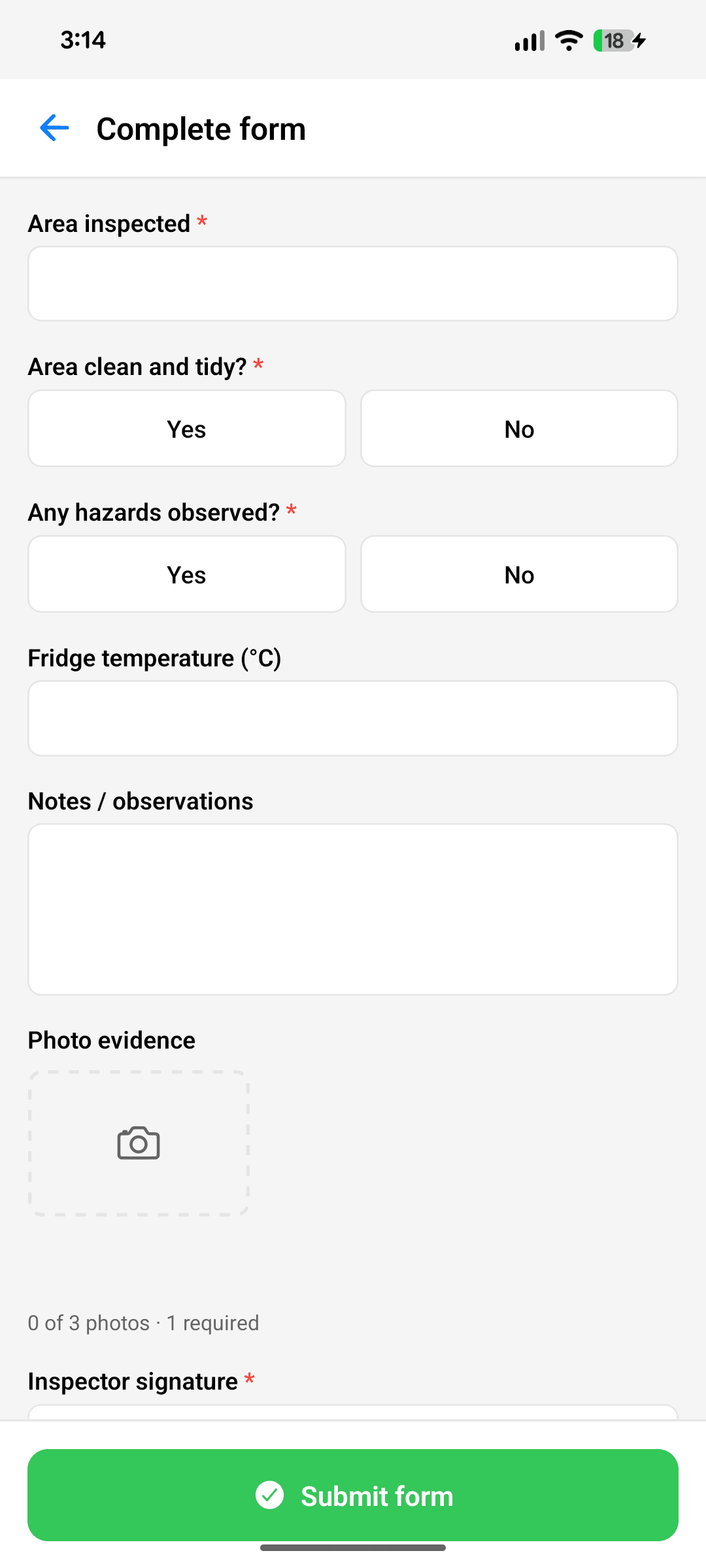
On the phone: scan, type the number, done
Staff use the same CheckTasks app they use for patrols and inspections. Scanning the tag opens the reading question for that appliance, and the scan time and place go into the record with the number.
Staff don't see the limits, so nobody is tempted to write down a “safe” number. The check against your limits happens in CheckTasks.
Anything with a number to log
Fridge temperatures are the most common example, but they're just the start. If someone reads a thermometer, test kit, gauge or meter on a schedule, CheckTasks can log it.
Fridges & freezers
The classic example: kitchen, bar and store fridges, freezers, cold rooms and display chillers.
Hot holding & cooking
Hot-hold cabinets, bain-maries and core cooking temperatures.
Pools & spas
pH, chlorine and water temperature — several readings from one scan.
Water temperatures
Hot and cold outlet temperatures for your legionella control checks.
Boilers & pressures
Boiler, sprinkler and pressure-vessel gauges in bar or psi.
Meters & tank levels
Electricity, gas and water meters, fuel and oil tank levels.
Everything an inspector will ask for
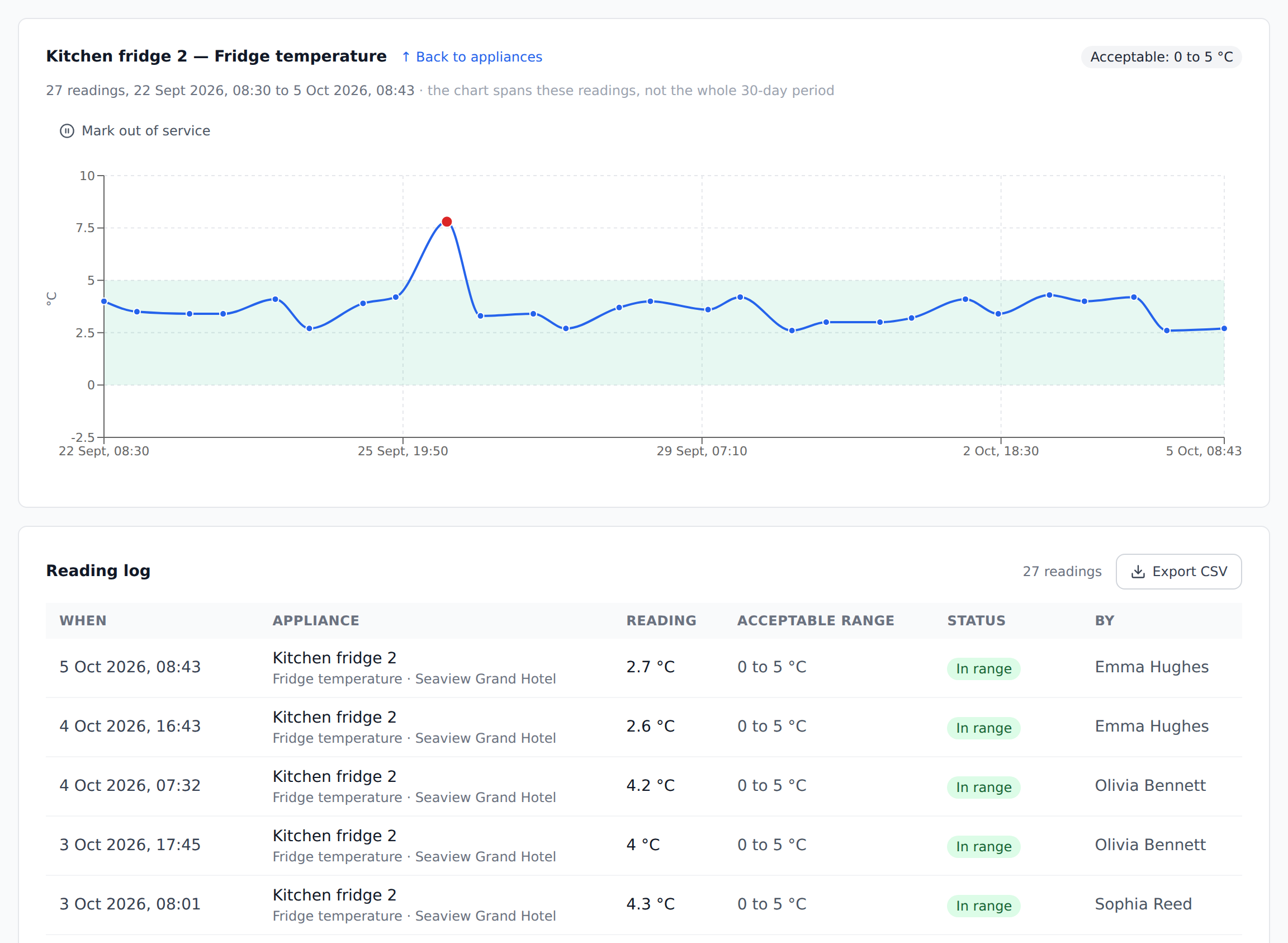
A dated reading, the limit it was checked against, who took it, and what happened when it was wrong.
Any number, any unit
Set a minimum, maximum or both for each type of check — fridge, pool pH, boiler pressure — and override them for individual items. Use any unit: °C, °F, pH, ppm, bar, kWh, litres and more.
A record that can’t drift
Each reading keeps the limits that applied when it was taken, so changing a limit later never rewrites history.
Out-of-range & missed-check alerts
Set when checks are due — set times of day, or every few days with a grace period. Readings outside your limits, checks due soon and missed checks raise alerts.
Emailed to the right people
Choose who receives alert emails: admins, the site’s managers, and up to 20 other addresses such as a head chef or contractor.
Corrective actions on record
Managers acknowledge each alert and record what was done — "moved stock, engineer called" — right against the reading.
Trend chart for every reading
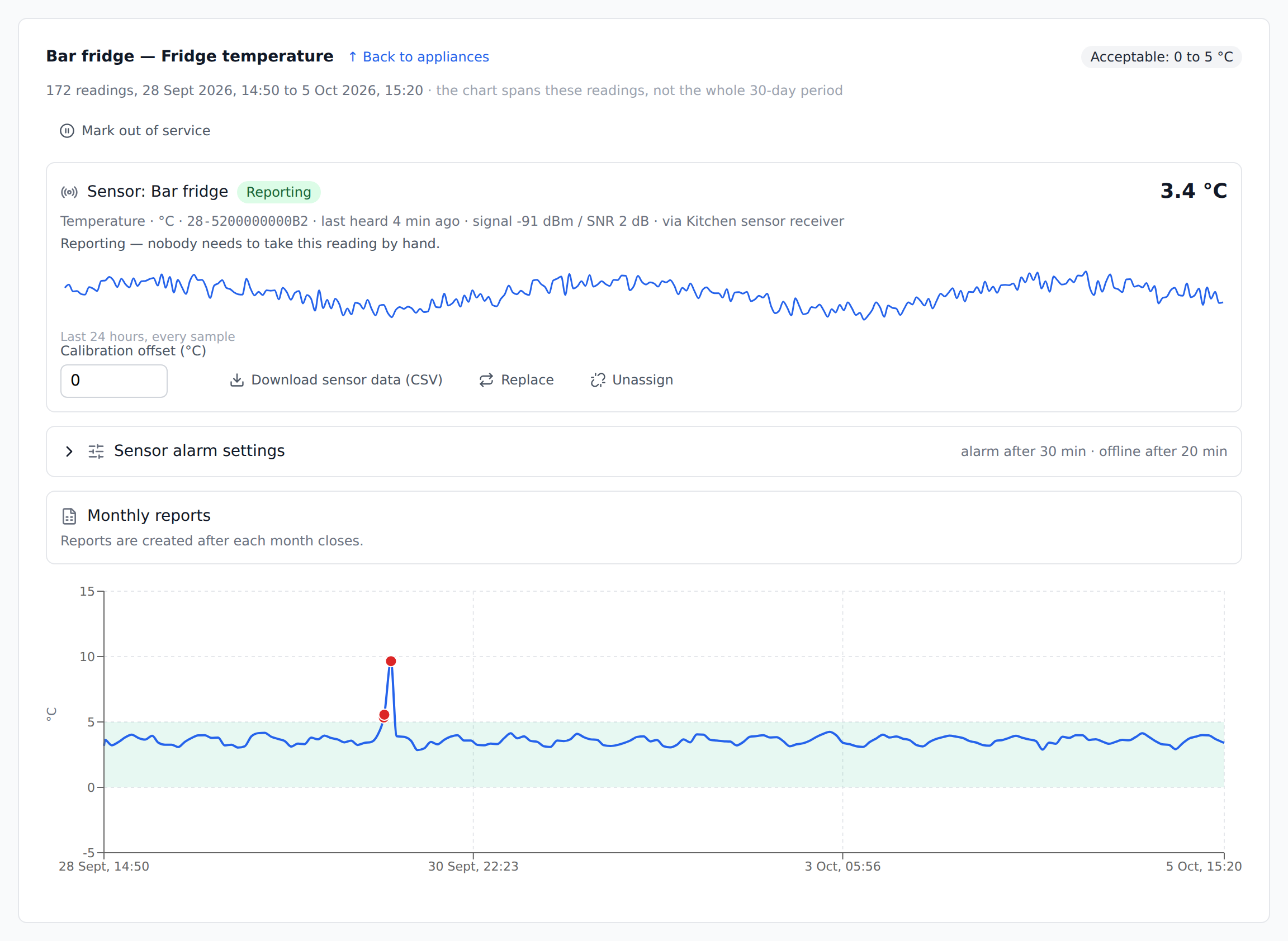
See each reading over 7, 30 or 90 days with your acceptable range shaded and breaches in red — spot a fridge warming up or a meter climbing before it becomes a problem.
Weekly compliance summary
A weekly email showing how many checks were done on time for everything you monitor, on the day and time you choose.
Out of service & seasonal closures
Mark a fridge as broken or a pool as closed for winter, with a reason and expected return date, so it doesn’t show as missed.
Export every reading
Download the full log — values, limits, who, when and corrective actions — as a CSV for inspectors or auditors.
Works offline
Readings taken in a basement plant room, a meter cupboard or a walk-in freezer sync automatically when signal returns — and still count as done.
Why not just a clipboard on the wall?
Still on paper for now? Use our free printable fridge temperature log.
A paper log — on the fridge door, in the plant room, by the meter — tells you a number was written down. It doesn't tell you when, where, or whether anyone noticed it was wrong.
| Paper log | CheckTasks | |
|---|---|---|
| Proves the reading was taken on the spot | ||
| Out-of-range readings flagged straight away | ||
| Missed checks noticed without reading the sheet | ||
| Corrective action recorded against the reading | Sometimes | |
| Every site’s log in one place | ||
| Ready to export for an inspection | Find the folder |
And when a reading is wrong, the fix is on record
Each out-of-range reading raises an alert. A manager records what was done, against that reading.
Or let sensors take the reading
For fridges and freezers that need watching around the clock, wireless sensors can log the temperature automatically. You get the same limits, alerts and records, without waiting for someone to walk past. Now in pilot with a UK hotel group.
Logged day and night
Temperatures are recorded automatically around the clock — overnight, weekends and bank holidays, not just when someone walks past.
Alarms that ignore the door
An alarm is raised only after a reading has stayed out of range for a time you choose, so a delivery or a busy service doesn’t set it off.
Told if a sensor goes quiet
If a sensor stops reporting you get an alert, so a silent fridge is never mistaken for a healthy one.
The same record as manual checks
Sensor readings go into the same log, with the same limits, trend charts, corrective actions and exports as readings taken by staff.
Staff as the back-up
If a sensor fails, staff can scan the appliance and enter the reading by hand, and it still counts.
Not just temperature
Fridges and freezers come first, but humidity and door sensors are supported too.
Set up a whole site in minutes
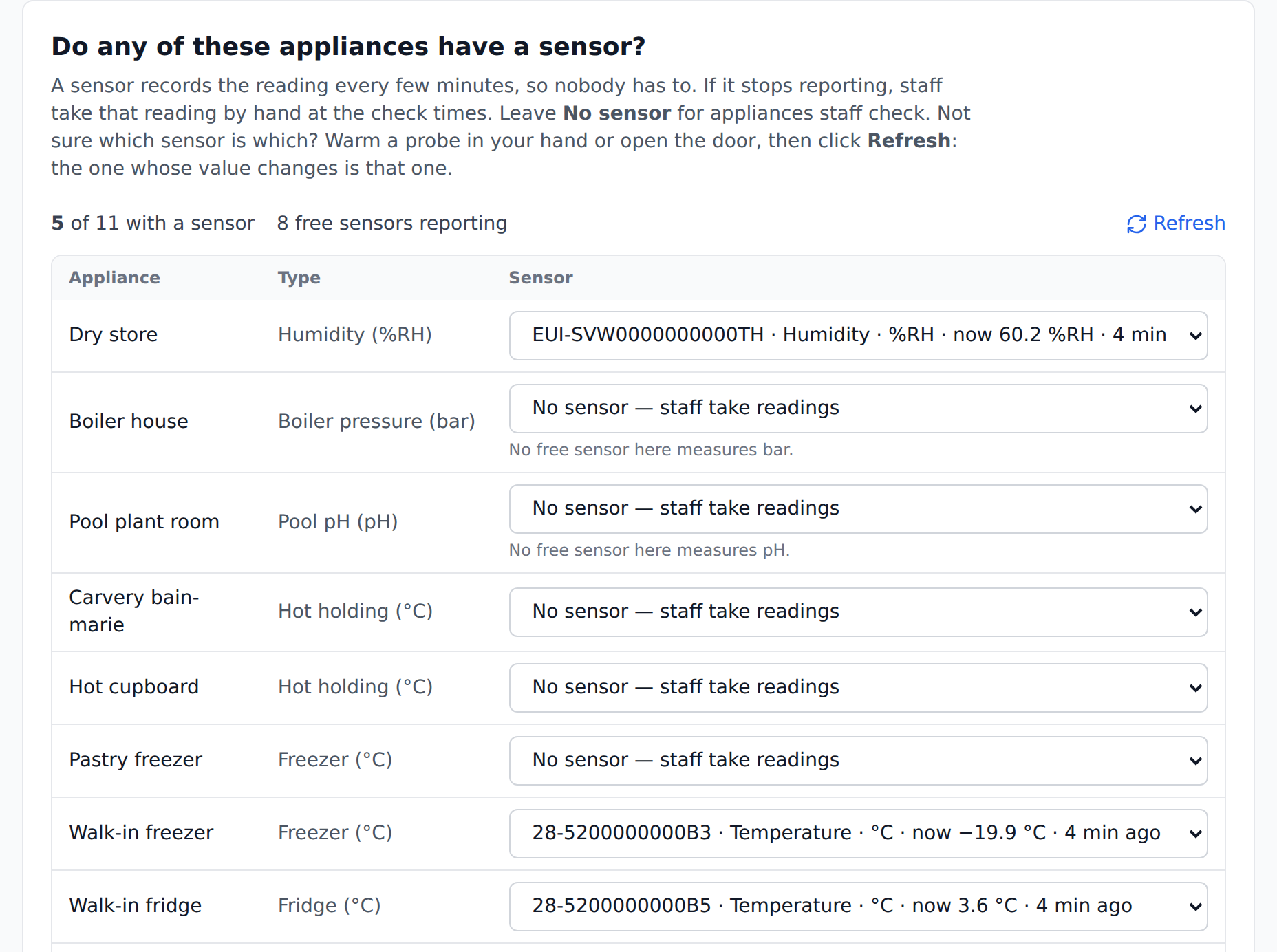
A step-by-step setup wizard creates the checklists, checkpoints, round, schedule and alert settings in one go.
- 1Choose the site
- 2Pick what you’re checking — fridge, freezer, hot holding, or your own (a pool, a boiler, a meter…)
- 3Add each item (or convert existing QR stickers)
- 4If you have sensors, choose which appliances they read
- 5Set when checks are due — up to six times a day
- 6Choose who does the checks
- 7Choose who gets alerts
- 8Review — CheckTasks builds the forms, round and schedule for you
Included free on every plan
Readings and appliance checks come with every CheckTasks plan at no extra cost. Start your 30-day trial, let us know you'd like readings, and we'll switch them on — usually within one working day.
- 30-day free trial
- No credit card
- Free setup help
- Free paper-form conversion
Frequently asked questions
Do I need to buy sensors?
No. Your staff take the reading with the thermometer, test kit, gauge or meter you already use, scan the QR code or NFC tag, and type the number into the app. If you would rather have fridges and freezers logged automatically, wireless sensor monitoring is in early access as a paid add-on — ask us about joining.
How much does it cost?
Nothing extra. Readings and appliance checks are included on every CheckTasks plan, including the free 30-day trial.
How do I switch it on?
Start your free trial, then tell us you would like readings switched on using our contact form, and we will switch them on for your account, usually within one working day. The setup wizard then walks you through the rest.
Will this make us compliant — HACCP, legionella, pool safety?
CheckTasks helps you keep the dated readings and corrective actions that inspectors expect to see — for example, the fridge temperature records an environmental health officer asks for under your food safety plan. It is a record-keeping tool — it doesn’t certify you, and your safety procedures remain your responsibility.
Can sensors take the readings automatically?
Yes — wireless sensor monitoring is in early access and currently in pilot with a UK hotel group. Sensors log fridge and freezer temperatures around the clock, alarm when a reading stays out of range or a sensor goes quiet, and feed the same log, charts and exports as manual readings. It is a paid add-on, priced on request. Register your interest through our contact form.
Who gets alerted when a reading is out of range?
You choose. Alert emails can go to your admins, the managers of the site concerned, and up to 20 other addresses. Alert and weekly-summary emails are off until you switch them on, so you control exactly who is notified and when. Missed-check emails are only sent between 7am and 10pm.
Can one checkpoint record more than one reading?
Yes. A pool plant room, for example, can record pH, chlorine and water temperature from a single scan, each with its own limits.
What about equipment that is broken or closed for the season?
Mark them out of service with a reason and an expected return date. They stop counting as missed until they are back in service — individually or in bulk.
Does it work on iPhone?
Readings are taken in the CheckTasks Android app. An iPhone version is coming soon. The web dashboard, charts and exports work on any device.
Stop chasing the log sheets
30 days free, every feature, no credit card. We'll switch on readings for you.
Start Free Trial